FAQs
No items found.

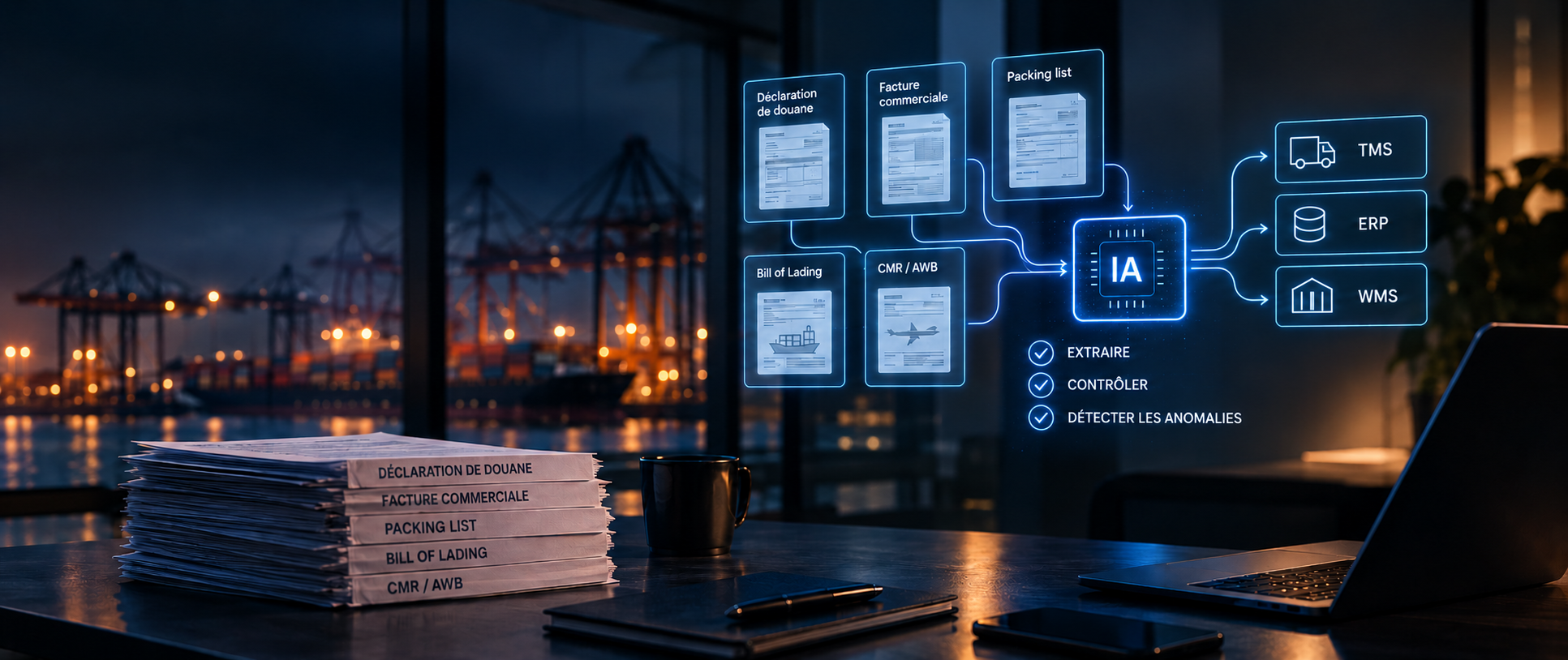
A customs declaration arrives by email. Included with it are an invoice, a packing list, and a bill of lading.
The first level of automation is now well established: identifying documents, extracting data, and feeding that data into a TMS or ERP system.
But let's imagine that, for the same shipment, the total gross weight is listed as 10,000 kg on the invoice, 9,800 kg on the packing list, and 10,200 kg on the B/L, in their most recent versions.
The three data points were successfully extracted.
However, these discrepancies warrant further investigation.
What information should we focus on? Why do these values differ? And should we let the case proceed?
That's where document automation takes on a whole new dimension.
It's no longer just a matter of reading a document or extracting data from it. We need to cross-reference information, verify its consistency, detect anomalies, and know when to involve a human operator.
Automation isn't just about processing documents faster. It's about getting reliable information to the right system at the right time.
Automating a document workflow involves more than just extracting data from a PDF. You need to consider the entire process, from the moment the document arrives until it is used in the business system.
Retrieve documents, whether they arrive via email, PDF, a portal, or an existing system.
Identify the type of document and the relevant information: invoice, packing list, bill of lading (B/L), shipping order, certificate, etc.
Compare data across documents, repositories, and systems. This is the stage at which inconsistencies can be detected before they turn into operational errors.
Transmit reliable data to the TMS, ERP, WMS, or customs system and trigger the planned actions.
When information is uncertain or an anomaly requires a business decision, the operator takes over.
Automation must follow the flow of information, not just that of the document.
Using the example of shipping.
*Same shipment, latest versions of the documents
The extraction is working.
Integration is working.
Automation works.
However, the reliability of the data has not been established.
The system did indeed retrieve three data points. It does not yet know whether these values accurately represent the same quantity, nor which one should be used.
This is the limitation of automation that stops at data extraction: a piece of data may be extracted perfectly, yet still be inconsistent with the rest of the file.
Before transmitting the information to the business system, it must be reconciled, verified, and any discrepancies flagged. This is the purpose of document reconciliation.
Reconciliation no longer involves processing each document separately, but rather matching the information that describes the same transaction:
The audit may cover several levels: between documents, against operational data, against regulatory standards, or against the company's internal data.
Here are a few examples:
Simply extracting data is not enough; you must verify that it is consistent with other sources before continuing the process.
Reconciliation thus becomes an essential component of document automation:
extract → compare → verify → detect discrepancies → trigger the appropriate action.
In the case of an international shipment, not all documents arrive at the same time, and each one provides a portion of the information needed for processing.
A customs declaration arrives via email along with its attachments.
The system identifies the documents, extracts the relevant information, and sends the data to the TMS.
The operator no longer has to re-enter the same data. The operator steps in when a case requires verification or a decision.
The invoice, packing list, and bill of lading arrive next.
Their data is extracted and then cross-checked to verify references, quantities, weights, or values.
If the information matches, the case will continue to be processed.
If a discrepancy arises, the system identifies the relevant data and flags the item for verification.
A discrepancy is detected: the system identifies the relevant data and the documents causing the discrepancy, and alerts the operator.
The user can then analyze, correct, or validate the text, depending on the context.
The operator then reviews the case and either approves it, corrects it, or requests further action.
The goal is not to eliminate human involvement, but rather to focus it on situations that truly require a decision.
Once the checks have been completed, the data can continue on to the TMS, ERP, WMS, or the relevant business application.
Automation doesn't stop at extraction; it guides the document all the way to verified, actionable data.
Once the data has been extracted, automation can go a step further: verifying that the information is complete, consistent, and compliant with the business process.
Compare information that is common to multiple documents:
Invoice ↔ packing list ↔ B/L
References, quantities, weights, or values can be compared to identify discrepancies.
Verify that a file contains all the necessary documents and information before proceeding with its processing.
Compare the information in the file with the applicable rules and requirements, particularly those related to customs procedures.
Compare a shipping invoice with the quote or the agreed-upon pricing terms to identify any discrepancies.
Compare the data extracted from the documents with the data already in the TMS or ERP.
In all these cases, the goal remains the same: not only to retrieve data, but also to verify that it is reliable within its business context.
Detecting an anomaly does not mean it must automatically be corrected. In sensitive logistics processes, automation must identify deviations and guide the appropriate action.
The system can:
detect → monitor → alert → recommend
He identifies the discrepancy, locates the relevant information, and indicates which point needs to be verified.
Certain situations require a business decision, particularly when they involve:
The process then becomes:
analyze → decide → approve
The goal is not to replace the expert, but to allow the expert to focus on exceptions rather than on systematically reviewing every document.
Reliable automation must also make it possible to understand why an anomaly was flagged and what decision was made.
You need to be able to find:
This traceability is essential when processes are subject to control or audit requirements.
Not all document-based processes have the same potential.
So the best place to start isn't necessarily the process that contains the most documents.
It is the one where volume, repetition, manual checks, and cross-referenced data create a workload or risk significant enough to justify automation.
Before choosing a technology, you need to look at the process itself.
A process that is very large-scale, repetitive, and based on recurring document reviews is generally a good candidate.
Conversely, a low volume, highly variable documents, or a high proportion of business decisions may justify retaining a greater degree of human involvement.
We shouldn't automate just for the sake of automating; instead, we should focus on the steps where automation provides real benefits without losing control of the process.
Automation cannot be measured solely by the number of documents processed. It is important to assess what it actually changes in the process.
Four indicators are used to track results:
The last indicator should be interpreted with caution: greater automation is not necessarily better if it increases the number of undetected errors.
The right KPI isn't just the extraction rate. It's the rate of cases that are actually processed all the way through.
Performance is thus measured at the business process level, not just in terms of the technology used.
This approach aligns with trends in the IDP market: classification, extraction, structuring, and even human-in-the-loop validation are now considered core capabilities. Differentiation is shifting toward process automation, workflows, and agents.
Automation goes far beyond classification and extraction. The level to aim for depends primarily on the complexity of the process and the decisions that need to be made.
Document classification, data extraction, and data transfer to business systems.
Document reconciliation, consistency and completeness checks, and compliance checks.
The system can perform a sequence of actions, make recommendations, and handle certain decisions under human supervision.
This is where a document-centric, agentic AI approach can add a new dimension.
When the process requires cross-referencing multiple documents, preserving their context, applying business rules, and determining the next steps, the agent can analyze the case, recommend an action, and orchestrate the process, while allowing a human to intervene when the decision calls for it.
Not all decisions should be automated across the board, but we should automate every step that can be automated while retaining control where necessary.
Automating document processing isn't just about extracting data faster. It's about delivering reliable information to the right system with as little human intervention as possible.