

Ensure the accuracy of your declarations and streamline your AEO self-assessments

Entrust your set of documents to Docloop: the solution extracts the data and verifies its completeness, consistency, and compliance before filing the declaration. After the declaration is filed, it reconciles the reported data with the source documents to facilitate your AEO self-assessment.

Book a demo
Book a demo

Check your files at
at two key times

Docloop is used either before filing to ensure the accuracy of the tax return and/or after filing to facilitate your AEO self-assessment.

01 - Completeness

Avoid delays caused by an incomplete set of documents

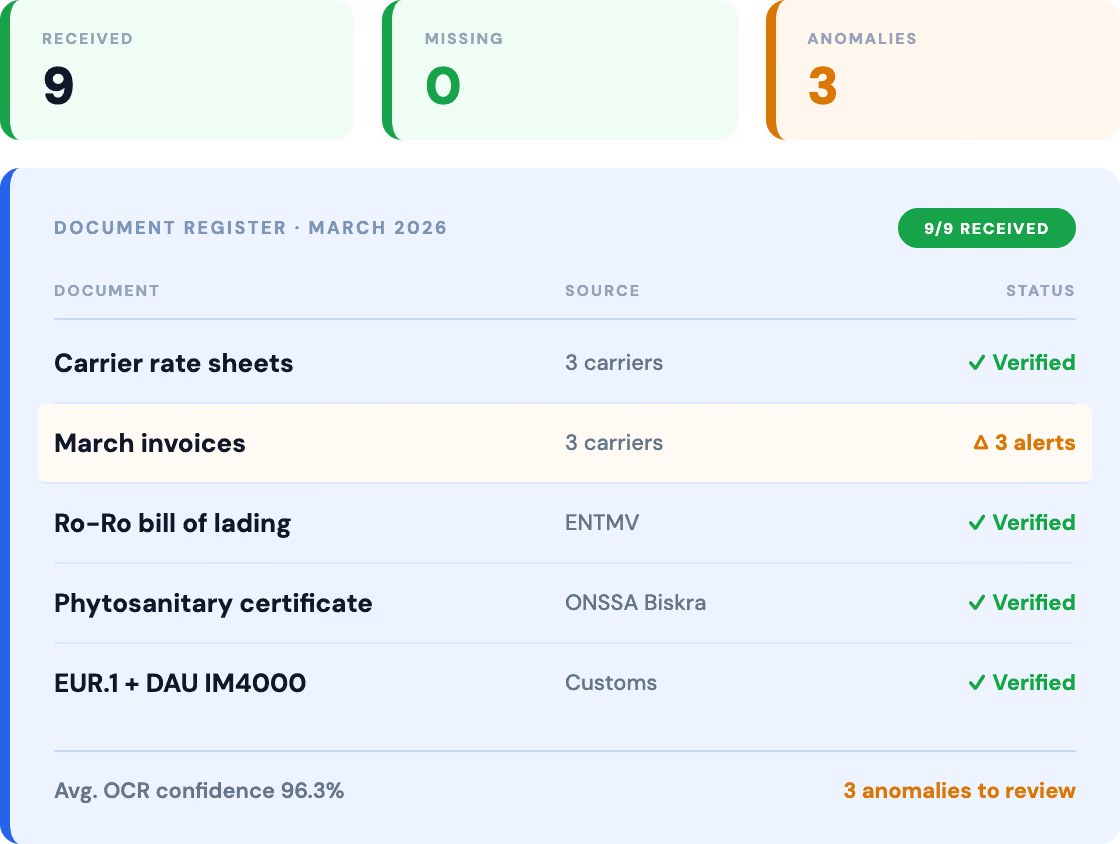
Docloop automatically verifies that the file contains all the required documents and immediately flags any missing documents or information before beginning to prepare the return.

Completeness Check for an Import or Export File

Extraction and Organization of Data from the Financial Statements

Identification of Missing Required Documents and Information

Document Registry Table for March 2026 showing 9 received, 0 missing, and 3 issues to be addressed.
The consolidated document shows the automatic consolidation of package details, weight, volume, and loading and unloading locations.
02 - Consistency

Identify discrepancies between your documents

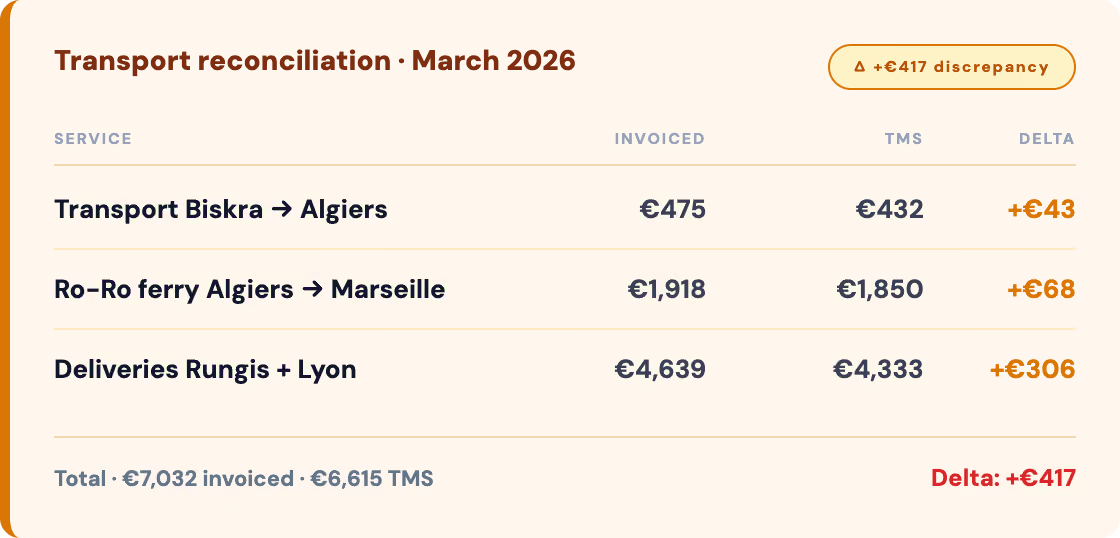
Docloop compares the data in all the documents in the file and flags any inconsistencies before filing. Data from multiple documents is aggregated into a single consolidated document.

Commercial Invoice/Packing List Verification

BL or AWB Verification / Commercial Invoice

Detection of discrepancies in weight, quantity, value, part number, and origin

Consolidating data from multiple documents into a single consolidated document

03 - Compliance

Check for compliance before filing

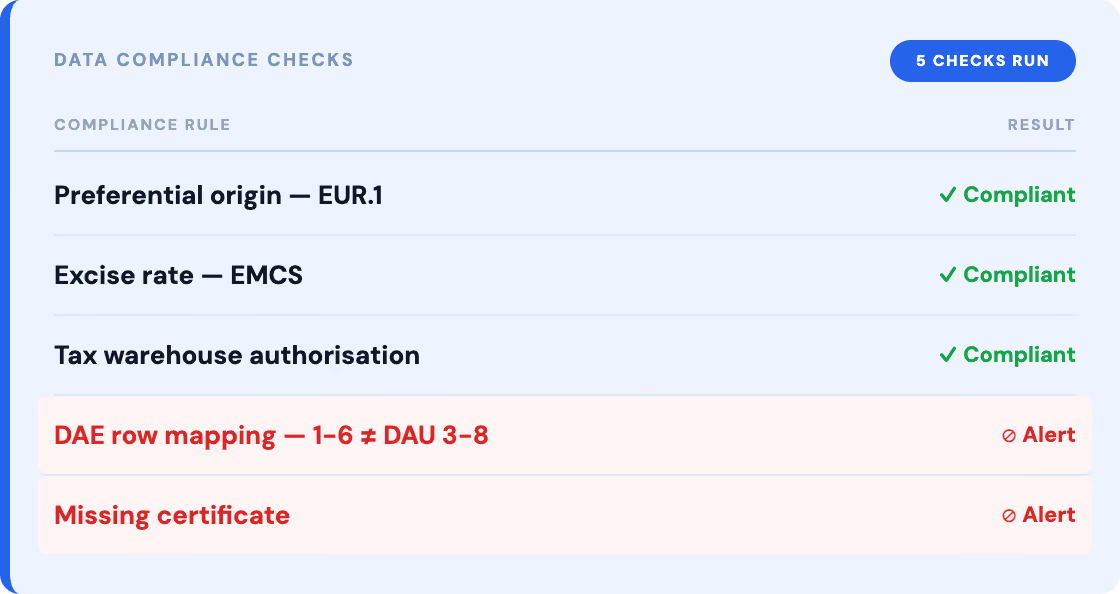
Docloop compares the extracted data against your business rules and customs regulations. Each value is verified against its source, and non-compliances are identified before the declaration is filed, while also speeding up the preparation process.

Verification of Customs Codes (HS / CN / TARIC)

Verification of Values, Weights, and Origins

Implementation of Your Internal Business Rules

Verification of Regulatory Documentation Requirements

Table showing data compliance checks, with three compliant results and two red alerts.
03 - AEO Audit

Make your AEO self-assessment easier

Compliance depends not only on the quality of the documents but also on adherence to the customs, tariff, and business rules specific to your organization. Docloop automatically checks the extracted data by comparing it to your internal reference systems, your business rules, and applicable regulatory requirements. Non-compliances are identified before transmission.

Verification of Customs Codes

Verification of Reporting Data

Verification of Internal Business Rules

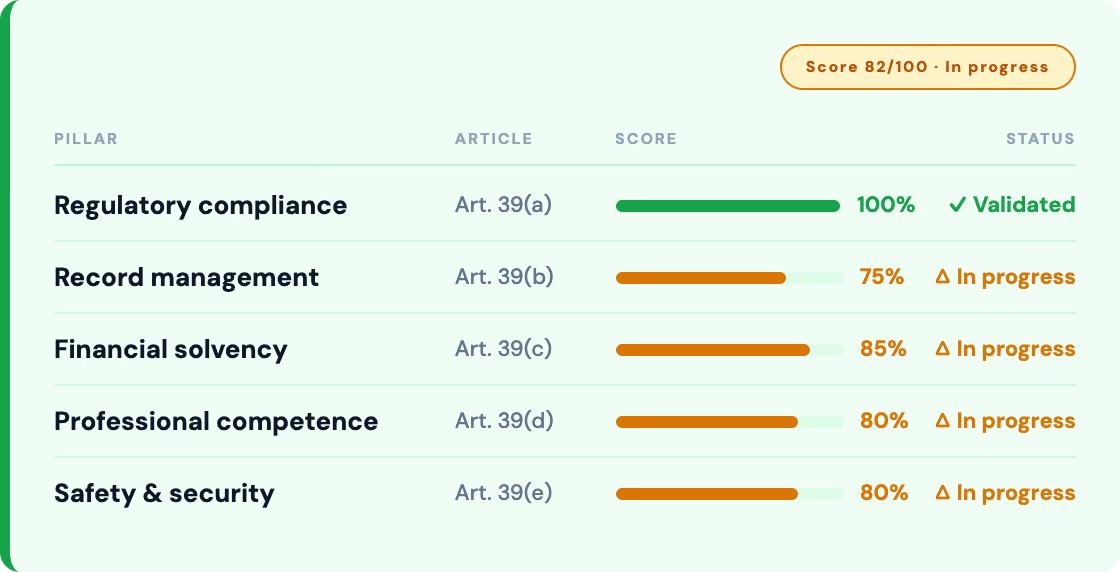
Preparing for AEO Audits

Compliance score table for five pillars, with green and orange progress bars, and "Validated" and "In Progress" statuses.

Designed for customs documentation processes

Unlike OCR or customs clearance software, Docloop extracts and verifies your documents—both before and after filing—without requiring you to change your tools.

Designed for customs documents

We support more than 100 types of transportation, logistics, and customs documents, regardless of their format, language, or quality.

Much more than just OCR

Docloop does more than just extract data: it cross-references information across documents and automatically detects inconsistencies and non-compliance.

The declarant retains decision-making authority

Docloop prepares and verifies the information. Final approval and decisions always remain in the hands of the customs teams.

Integration with your existing tools

Docloop integrates with your customs, ERP, TMS, and EDM software, as well as your internal applications, to feed your processes without the need for re-entry.

A phased rollout

Start with a workflow, a document type, or a priority control rule, and then gradually expand the automation.

Support for AEO Self-Assessment

The traceability of data and controls makes it easier for you to conduct your AEO self-assessment and prepare for follow-up audits.

What teams that use Docloop every day have to say.

"Transcausse uses Docloop to automate document extraction for customs operations. The solution is integrated with their EDM system, their ERP, and several in-house tools."

Transcausse

Freight Forwarder

80% - Reduced customs processing time

20–30% - Increased document productivity

"AGL uses Docloop to automatically capture and extract data from complex customs and logistics documents in a multi-country, multi-format environment. The solution integrates with the group's customs, TMS, WMS, and ECM platforms."

AGL

Multi-country customs broker

From a few hours to a few minutes - Handling complex cases

Multi-country - Multi-format deployment in production

"Docloop is integrated with the proprietary EasyClear® and Drop & Book platforms to automatically extract data submitted by customers. Customs teams retain the final approval before processing."

C4 Logistics

Logistics & Customs

+80% - Accuracy vs. manual processing

10 min - Saved per processed document

Process more cases.
‍With fewer errors.

Our teams will guide you through every step—from analyzing your workflows to operational deployment—use case by use case.

Frequently Asked Questions
01.
What is Intelligent Document Processing (IDP) in the transportation industry?

No. Docloop does not file customs declarations and does not replace your customs clearance software. It extracts data from the declaration package, verifies the files, and then transmits validated data to your systems. The declarant retains final approval.

02.
What types of documents can Docloop process?

OCR extracts text from a document. Docloop understands the structure of documents, matches information across multiple documents, performs consistency and compliance checks, and then integrates the results into your systems.

03.
Does Docloop integrate with my existing TMS?

Over 100 types of transportation, logistics, and customs documents: commercial invoices, packing lists, BLs, AWBs, CMRs, certificates of origin, customs documents, DAEs, delivery slips, and many others—regardless of their format, language, or quality.

04.
What is the difference between Docloop and standard OCR?

OCR simply reads the characters in a document. Docloop goes far beyond that: it understands the document’s semantic structure, extracts relevant fields, matches data across multiple documents, verifies compliance with business rules, and integrates the results into your systems.

05.
How long does it take to deploy Docloop?

Deployment typically takes anywhere from a few days to a few weeks, depending on the complexity of your document workflows and the number of systems to be connected. A plug-and-play approach is available for standard configurations.